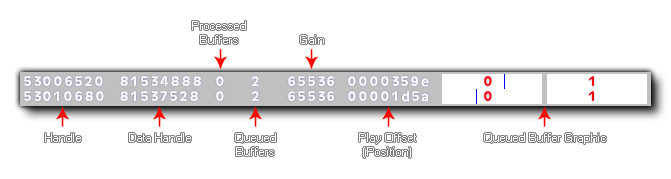
This function can be used to display debug information about the audio system, with true switching it on and false to switch it off. When you are debugging audio in this way, the overlay will show the following information:
For synchronised groups of audio, you also have the function audio_sync_group_debug().
NOTE This function does not work on the HTML5 target platform.
audio_debug(enable);
| Argument | Type | Description |
|---|---|---|
| enable | Boolean | Enable (set to true) or disable (false) audio debugging. |
N/A
if (debug_mode)
{
audio_debug(true);
}
else
{
audio_debug(false);
}
The above code will switch on or off the audio debug overlay depending on whether the game is running in debug mode or not.