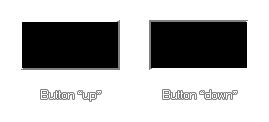
This function will draw a very simple, rectangular "button" using the currently selected draw colour and alpha where the up argument defines how the beveled edge effect looks, as shown in the image below:
NOTE If you want to draw a shape using a shader, you should be aware that most shaders expect the following inputs: vertex, texture, colour. However, when using this function, only vertex and colour data are being passed in, and so the shader may not draw anything (or draw something but not correctly). If you need to draw shapes in this way then the shader should be customised with this in mind.
draw_button(x1, y1, x2, y2, up);
| Argument | Type | Description |
|---|---|---|
| x1 | Real | The x coordinate of the left of the button |
| y1 | Real | The y coordinate of the top of the button |
| x2 | Real | The x coordinate of the right of the button |
| y2 | Real | The y coordinate of the bottom of the button |
| up | Boolean | Whether the button is up (true) or down (false) |
N/A
draw_button(100, 100, 200, 150, !mouse_check_button(mb_left));
This will draw a button which will appear pressed if the left mouse button is held down.