collision_point
Collision_point checks the point specified by the arguments x1,y1 for a collision with any instance of the object specified by the argument "obj". this check can be either precise or not, but for precise collisions to be enabled, the object or instance that you are checking for must also have precise collisions enabled for their sprite. If not, the default check is based on bounding boxes. The following image illustrates how this works:
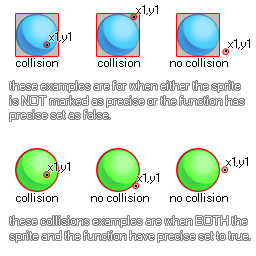 Remember, for precise collisions to be considered both the object sprite and the collision function must have precise marked as on. It should also be noted that the return value of the function can be the id of any one of the instances considered to be in collision, so if three instance overlap at that point, any one of their ids could be the return value of the function.
Note that instead of an object index you can supply an instance id to check for a specific instance, or the instance keywords all, or other (depending on the event and current code scope).
Syntax:
collision_point(x, y, obj, prec, notme);
| Argument |
Type |
Description |
| x |
Real |
The x coordinate of the point to check. |
| y |
Real |
The y coordinate of the point to check. |
| obj |
Object Asset or Object Instance |
The object or instance to check for. |
| prec |
Boolean |
Whether the check is based on precise collisions (true, which is slower) or its bounding box in general (false, faster). |
| notme |
Boolean |
Whether the calling instance, if relevant, should be excluded (true) or not (false). |
Returns:
Object Instance or noone
Example:
if collision_point(x, y, obj_Cursor, false, true)
{
score += 10S;
}
Here we are checking the point at the position of the object that has the code for the object "obj_Cursor". If there is one, then we add 10 onto the score variable.