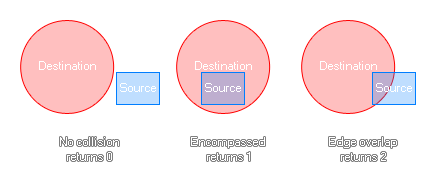
This function will check a rectangular area that you define to see if it is either not in collision, completely within the destination bounds, or if it is simply touching, a defined circular area. If they are not touching at all the function will return 0, if the source is completely within the destination it will return 1, and if they are simply overlapping then it will return 2. The image below illustrates this:
rectangle_in_circle(sx1, sy1, sx2, sy2, x, y, rad);
| Argument | Type | Description |
|---|---|---|
| sx1 | Real | The x coordinate of the left side of the source rectangle. |
| sy1 | Real | The y coordinate of the top side of the source rectangle. |
| sx2 | Real | The x coordinate of the right side of the source rectangle. |
| sy2 | Real | The y coordinate of the bottom side of the source rectangle. |
| x | Real | The x coordinate of the centre of the circle |
| y | Real | The y coordinate of the centre of the circle. |
| rad | Real | The radius around the center point in which to check for a collision. |
inst = instance_nearest(x, y, obj_Bullet);
if instance_exists(inst)
{
if rectangle_in_circle(inst.x - 5, inst.y - 5, inst.x + 5, inst.y + 5, x, y - 25, 20) > 0
{
hit = true;
}
}
The above code uses the rectangle_in_circle function to check for a collision within a circular area and the rectangle around a found instance. If there is a collision (either an edge overlap or encompassed) then a variable will be set to true.