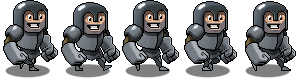
 The above strip image contains 5 frames. Its filename is PlayerSprite_strip5.png, indicating it has 5 frames, which GameMaker uses to divide it into separate sub-images.
You can use "strip images" to easily import animated sprites into GameMaker.
A strip image contains multiple frames, laid out horizontally, starting from the left. The name of a strip image file must end with "_stripN", where "N" is the number of frames in the animation.
The above strip image contains 5 frames. Its filename is PlayerSprite_strip5.png, indicating it has 5 frames, which GameMaker uses to divide it into separate sub-images.
You can save this image and drag it into GameMaker right now, and it will be imported as an animation:
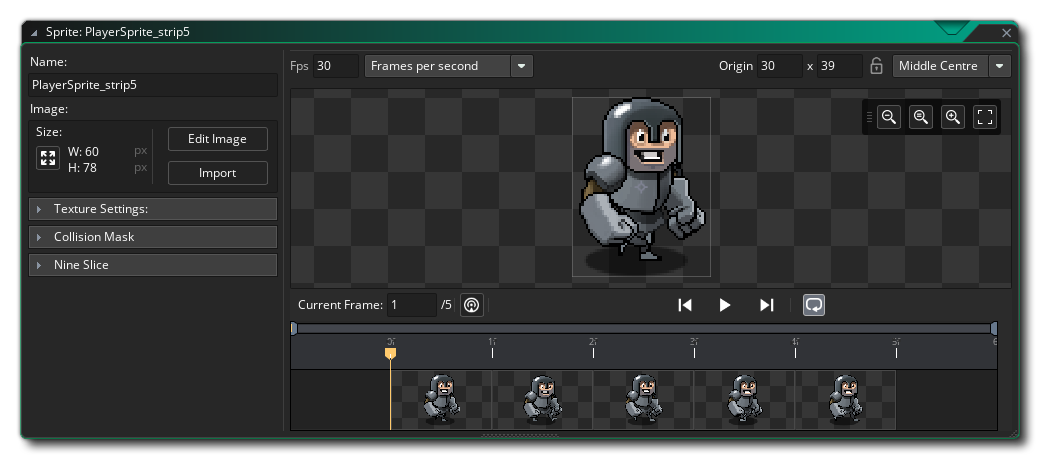 You can import a strip image via the "Import" button in the Sprite Editor, by dragging it into the IDE, or loading it at runtime with sprite_add().
The width of the final sprite will be equal to the total width of the strip image divided by the number of frames in its filename. For example, a 250px-wide strip with 5 frames will result in a 50px-wide image.
You can create a strip image to be used as a font, where each character is a frame in the strip image.
Such a strip image can be loaded at runtime using font_add_sprite().
You can save a sprite as a strip image file at runtime using sprite_save_strip(). This sprite may have previously been loaded via the IDE, at runtime with sprite_add(), or built from a surface.