Reporting Errors
While great care has been taken when creating GameMaker to ensure that it is a stable and reliable tool, there is always the possibility that an issue could occur given the nature of the software and the multiple operating systems it runs on.
Most IDE errors will be caught by GameMaker and you may see an error that GameMaker has gone "unstable", which also prompts you to save your projects and then close and restart the program.
If this happens, or you suspect that either the Runtime or the IDE contains a bug, then we would request that you file a bug report using the Report A GameMaker Bug option from The Help Menu. Please always give as much information as possible and ensure you fill in every field as best you can.
Please also strongly consider allowing the bug reporter to send us a copy of your project, as this may be essential to reproducing your problem and so we may be unable to help if you do not provide the project. Your files are always attached privately when you send them from the IDE bug reporter.
Report A Bug Window
The Help -> Report a GameMaker Bug option will open a window where you can create a bug report from within the IDE. If you're not signed in, a message is shown to ask you to Sign In/Register. It's also possible to Continue Anonymously.
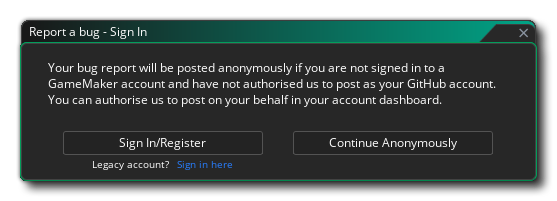 If you are using a GameMaker account, it is recommended to connect your GitHub account to your GM account via the GameMaker Account Dashboard. This will ensure your submitted reports are tied to your account so you can post updates and receive notifications from our team.
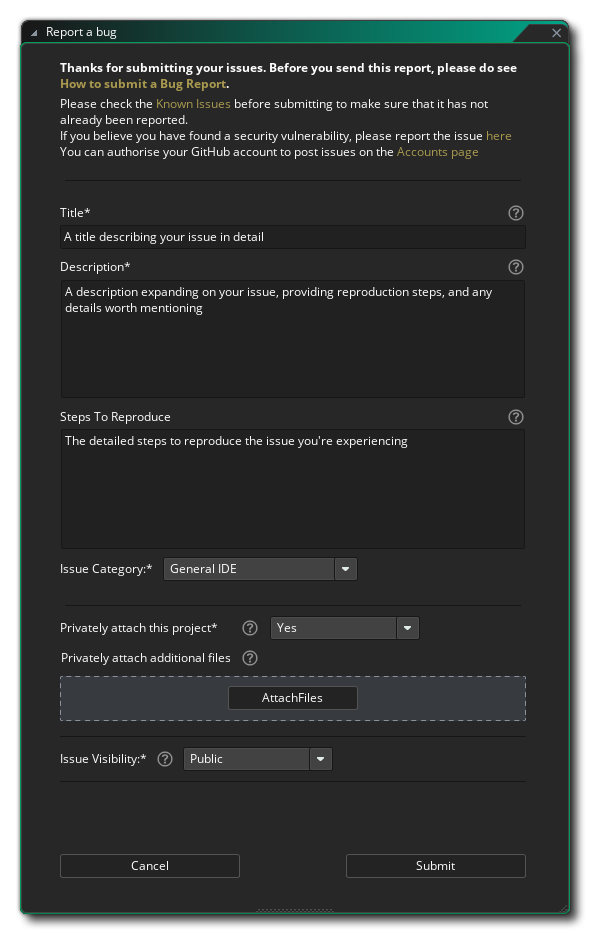 In the Report a Bug window you fill in a Title and Description and optionally the Steps To Reproduce the issue as well as assign the Issue Category.
You also have the option to Privately attach this project, which is generally required for many kinds of bug reports. You can also attach additional files. Finally, you should set the issue Visibility, either Public or Private (which does not affect your attached project and files, which are always private and only accessible by GameMaker staff).
As mentioned in the window, you should first check the list of Known Issues before submitting. You also have the possibility to report a security vulnerability.
NOTE Any files attached via the Bug Reporter are uploaded privately, only accessible by the GameMaker team, even when the bug is public.
TIP If you forgot to attach your project or any additional files with this dialog, you can use the Upload a Bug/Ticket Sample option in the Help menu to upload those files and get a link that you can add to your issue.
You can choose to include the current project by ticking the Include project checkbox. It is highly recommended that you provide a sample project that shows the issue as it provides important information to the GameMaker team about your issue. A message will be shown asking to include the current package when you select a category related to the runner and the checkbox isn't ticked.
Finally you can submit the report by clicking the Submit button.
Crash Detected Window
In extreme cases where GameMaker crashes entirely, you may see on your next startup that the IDE bug reporter tells you that an earlier crash was detected and it will ask you to send us a bug report. Please do this.
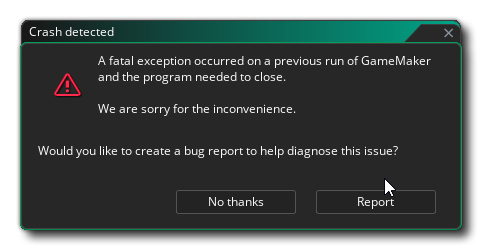 Clicking on Report will open the Report a Bug window described above.
To know exactly what data is being sent, then please see this article on the GameMaker Helpdesk.