Practical Exam Review
- The practical exam will be on Friday, June 12 and is open book. You may use your previous assignments and the Internet.
- You may NOT communicate with another person in any way or use a generative AI.
- You will have one hour to complete the questions. Those with IEPs allowing for extra time will be provided with this on a second day if needed.
- The scenarios you need to implement will be similar to this review. Complete the review in whatever files you would like.
Task 1 - Python Turtle
Start by pasting the following code into a blank Python file:
# Don't change anything in this first section
import turtle
from grid import draw_grid

draw_grid()
t = turtle.Turtle()

t.speed(1)
t.color("green")
t.width(3)

# Create your drawBump subprogram here (not needed until Step 4)


# Add the rest of your code here


# If you remove this line, the screen will close when the turtle is done
turtle.done()
Add code to this file, as per the instructions below, so that the final result looks like this screen:
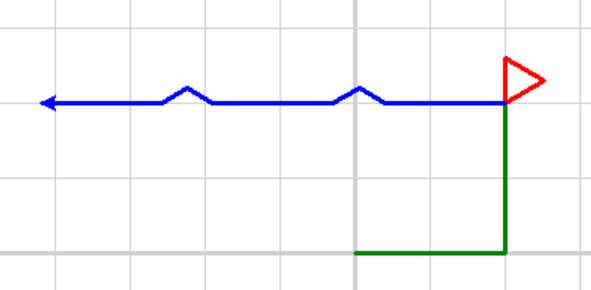
Step 1
- The turtle moves forward 100 pixels, makes a 90 degree left turn, then moves forward another 100 pixels
Step 2
- The turtle changes its colour to red
- Using a loop, the turtle draws an equilateral triangle with all sides of length 30.
Step 3
- The turtle turns left 90 degrees and changes its colour to blue
Step 4
- Create a subprogram called
drawBump, that does the following:- Turn right 30 degrees
- Move forward 20 pixels
- Turn left 60 degrees
- Move forward 20 pixels
- Turn right 30 degrees
Step 5
- The turtle moves forward 80 pixels
- The turtle calls the
drawBumpsubprogram - The turtle moves forward 80 pixels
- The turtle calls the
drawBumpsubprogram - The turtle moves forward 80 pixels
Task 2 - Text Based Problem
In this problem, you will determine someone's average driving speed based on how far they've driven and how much time they've been driving.
-
Ask the user for three pieces of information:
- Their name (store as a string)
- How far they drove in km (store as an
int) - How long they drove in minutes (store as an
int)
-
Calculate:
- The number of hours they've driven (by dividing minutes by 60)
- Their average speed in km/h (speed = distance divided by time)
-
Output:
- A greeting by name (eg -
Hi Bob) - Their average speed, within a sentence (eg -
Your average speed was 100 km/h)
- A greeting by name (eg -
-
Conditional output:
- If their average speed is more than 110 km/h, print
Too fast - If their average speed is less than 80 km/h, print
Too slow
- If their average speed is more than 110 km/h, print
When you run your program, it should look something like this:
What is your name? Joe
How far did you drive in km? 200
How long were you driving for in minutes? 100
Hey Joe
Your average speed was 120.0 km/h
Too fast!
Sample Answers
Question 1
# Don't change anything in this first section
import turtle
from grid import draw_grid

draw_grid()
t = turtle.Turtle()

t.speed(1)
t.color("green")
t.width(3)

# Create your drawBump subprogram here (not needed until Step 4)
def drawBump():
    t.right(30)
    t.forward(20)
    t.left(60)
    t.forward(20)
    t.right(30)


# Add the rest of your code here
t.forward(100)
t.left(90)
t.forward(100)

t.color("red")
for i in range(3):
    t.forward(30)
    t.right(120)

t.left(90)
t.color("blue")

t.forward(80)
drawBump()
t.forward(80)
drawBump()
t.forward(80)

# If you remove this line, the screen will close when the turtle is done
turtle.done()
Question 2
name = input("What is your name? ")
km = int(input("How far did you drive in km? "))
minutes = int(input("How long did you drive in minutes?"))

hours = minutes / 60
speed = km / hours

print("Hi", name)
print("Your average speed was", speed, "km/h")

if speed < 80:
    print("Too Slow!")

if speed > 110:
    print("Too fast!")